We have all been there. You are standing in line at a coffee shop in the Proctor District, trying to look up a menu or a service on your phone, and the website just spins. You wait three seconds, maybe four, and then you hit the back button and try the next result.
That lost moment is exactly what Google wants to prevent. It is also why they created Page Speed Insights, a tool that has become critical for business owners in Tacoma and the Puget Sound region.
If your website is slow, you are not just annoying potential customers; you are likely invisible to them. Google uses page speed as a ranking factor, meaning slow sites often get pushed down in search results. Here is what you need to know about Page Speed Insights and what the data actually means for your local business.
Contents
Understanding the Tool
Page Speed Insights (PSI) is a free utility provided by Google that analyzes the performance of a web page on both mobile and desktop devices. When you enter your URL into the dashboard, it runs a series of tests to determine how fast your content loads and how quickly a user can interact with it.
Why Speed Matters for SEO
The data found in Page Speed Insights is not just about vanity metrics; it is about revenue. The connection between site speed and business growth is well-documented.
User Experience and Bounce Rates

A “bounce” happens when a user visits your site and leaves without interacting. Sites with poor Page Speed Insightsscores often have high bounce rates. If a user in Seattle searches for “emergency plumber” and your site takes five seconds to load, they are already calling your competitor before your logo appears.
Mobile-First Indexing
Google primarily uses the mobile version of the content for indexing and ranking. Since mobile devices often have slower processors than desktop computers, mobile optimization is non-negotiable. Checking your mobile score on Page Speed Insights is the first step to securing your search presence.
Conversion Rates
Faster sites convert better. Whether your goal is getting someone to fill out a contact form or call your office, a delay of just one second can significantly drop conversions. A poor showing on Page Speed Insights usually correlates with lower sales figures.
You can read more about how performance ties into our broader strategy on our SEO page.
Deciphering Your Score
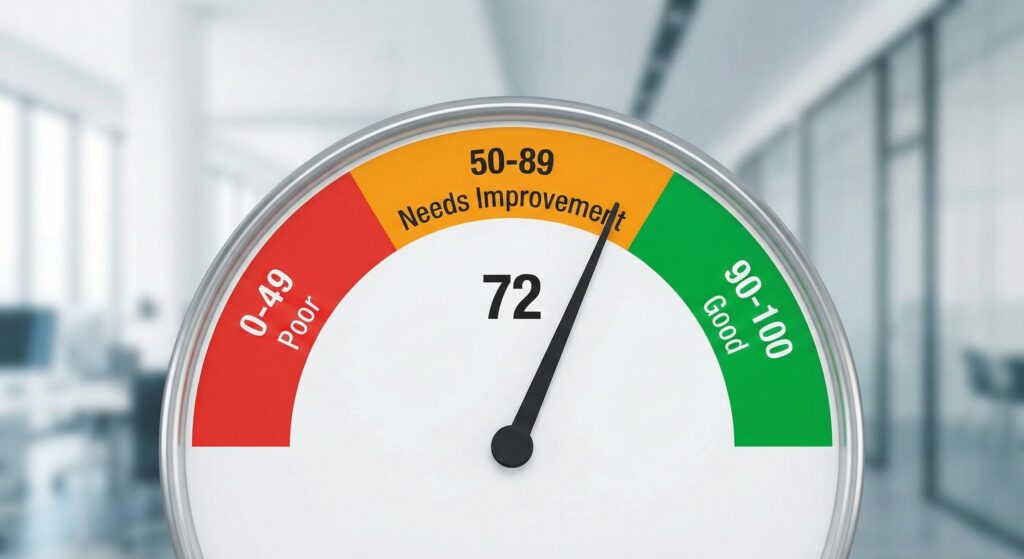
When you run your site through Page Speed Insights, you get a score from 0 to 100. It is easy to obsess over this number, but as a pragmatic agency, we advise you to look closer at what the tool is actually telling you.
- 90-100 (Green): Excellent performance.
- 50-89 (Orange): Needs improvement.
- 0-49 (Red): Poor performance.
Note: Do not panic if your Page Speed Insights result is not a perfect 100. Many highly functional, profitable websites score in the orange range because they load rich features like chat widgets, high-quality portfolio images, or third-party scheduling tools. The goal is not a perfect number; the goal is a fast experience for your user.
For the official technical breakdown of how these scores are calculated, you can reference Google’s documentation on PageSpeed Insights.
Core Web Vitals
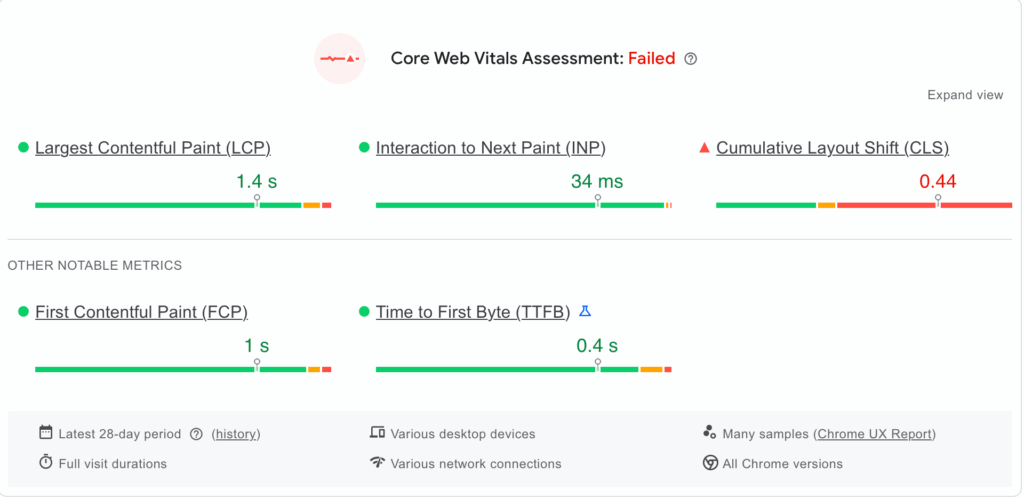
Within the Page Speed Insights report, you will see a section called “Core Web Vitals.” These are specific factors that Google considers critical for a healthy user experience.
Largest Contentful Paint (LCP)
This measures loading performance. Page Speed Insights marks the point in the page load timeline when the page’s main content (usually a hero image or headline) has likely loaded.
- Target: 2.5 seconds or less.
Interaction to Next Paint (INP)
This measures responsiveness. INP checks how quickly your page responds when a user clicks a button or taps a menu. If you click “Contact Us” and nothing happens for half a second, Page Speed Insights will flag this as a poor INP.
- Target: 200 milliseconds or less.
Cumulative Layout Shift (CLS)
This measures visual stability. Have you ever been reading an article and the text suddenly jumps down because an ad loaded above it? That is a layout shift. Page Speed Insights tracks these shifts to ensure your site is visually stable.
- Target: 0.1 or less.
How It Affects Local Rankings
In the greater Puget Sound area, competition for local services is fierce. When a homeowner in North End Tacoma searches for “kitchen remodeling,” Google wants to provide the best possible answer. That answer includes relevance, authority, and experience.
If your site has excellent content but fails the Core Web Vitals assessment in Page Speed Insights, Google may rank a competitor higher if their site is faster. This is especially true for mobile searches.
We have built many sites for local trades that prioritize speed to ensure they capture these leads. You can see examples of our work in our portfolio.
Common Issues Detected
Since 1994, GreenHaven Interactive has audited countless websites in Washington. We tend to see the same speed-killing issues pop up in Page Speed Insights reports repeatedly.
- Massive Images: Uploading a 5MB photo directly from your smartphone to your website is the most common mistake Page Speed Insights identifies.
- Cheap Hosting: Your hosting provider is the engine of your website. If you are on a bargain-bin plan, your metrics will suffer regardless of how well the site is coded.
- Bloated Plugins: Using too many plugins (especially on WordPress) adds unnecessary code. Page Speed Insights often flags this as “unused JavaScript.”
- Render-Blocking Resources: This technical term usually means your site is trying to load design elements before the content the user actually wants to see.
To learn more about our approach to fixing these foundational issues, visit our Home page.
Pragmatic Steps to Improve Scores
You do not always need a complete rebuild to improve your Page Speed Insights score. Here are actionable steps you can take.
Optimize Your Images
Compress every image before you upload it. Page Speed Insights frequently recommends using next-gen formats like WebP. This is often the single biggest “quick win” for speed.
Leverage Browser Caching
Caching stores parts of your website on the user’s device so it does not have to be re-downloaded every time they visit. Enabling this can drastically improve the numbers you see in Page Speed Insights.
Review Your Hosting Environment
If your target audience is in the Pacific Northwest, having a server located on the other side of the world hurts your latency. Ensure your host is reliable and fast.
Minimize Third-Party Scripts
Be choosy about the widgets you add. If you have a weather widget, a stock ticker, and three different tracking pixels, you are slowing down your user’s experience and hurting your Page Speed Insights score.
For a deeper dive into digital marketing topics, check out our blog hub.
When to Call Greenhaven Interactive

Sometimes, the issues flagged by Page Speed Insights are technical and rooted in the site’s architecture. Errors like “eliminate render-blocking resources” or “reduce initial server response time” often require developer intervention.
At GreenHaven Interactive, we focus on pragmatic solutions. We do not chase scores for the sake of scores; we optimize for the user. We look at the data, identify the bottlenecks that are actually hurting your conversions, and fix them.
If you are unsure why your site is performing poorly on Page Speed Insights, it might be time for a professional audit. Learn more about who we are and our history in Tacoma on our Our Story page.
You can also cross-reference Google’s data with other standards. For example, the W3C Web Performance Working Group outlines the technical standards that underpin many of these metrics.
Conclusion
Google’s Page Speed Insights is a powerful diagnostic tool, but it is just one part of the puzzle. For a local business in Tacoma or Seattle, the priority should always be providing a smooth, fast, and helpful experience for your neighbors. A fast site builds trust, keeps users engaged, and signals to Google that you are a quality resource.
If you are ready to speed up your site and improve your local visibility, we can help. Contact GreenHaven Interactive today to discuss your digital presence.
Looking for more SEO content? Check out our Ultimate SEO Guide for Small Businesses.